
CapCut vs KineMaster is one of the most common comparisons people make when choosing a mobile video editing app. Whether you are creating TikTok videos, Instagram Reels, YouTube Shorts, or professional content, picking the right editor can save you time and improve your results.
Imagine you have just recorded the perfect travel vlog. You open your phone, install a video editor, and suddenly realize there are dozens of editing tools, transitions, effects, and export options. Now you are wondering which app is easier to use and which one offers better value.
That is exactly why this CapCut vs KineMaster guide exists. Both apps are packed with powerful editing features, but they are designed for different types of creators. One focuses on simplicity and AI-powered editing, while the other offers more traditional timeline editing with advanced controls.
In this detailed CapCut vs KineMaster comparison, you will discover the key differences, pricing, strengths, weaknesses, and which app deserves a place on your smartphone or computer. By the end, you will know exactly which editor matches your editing style and content creation goals.
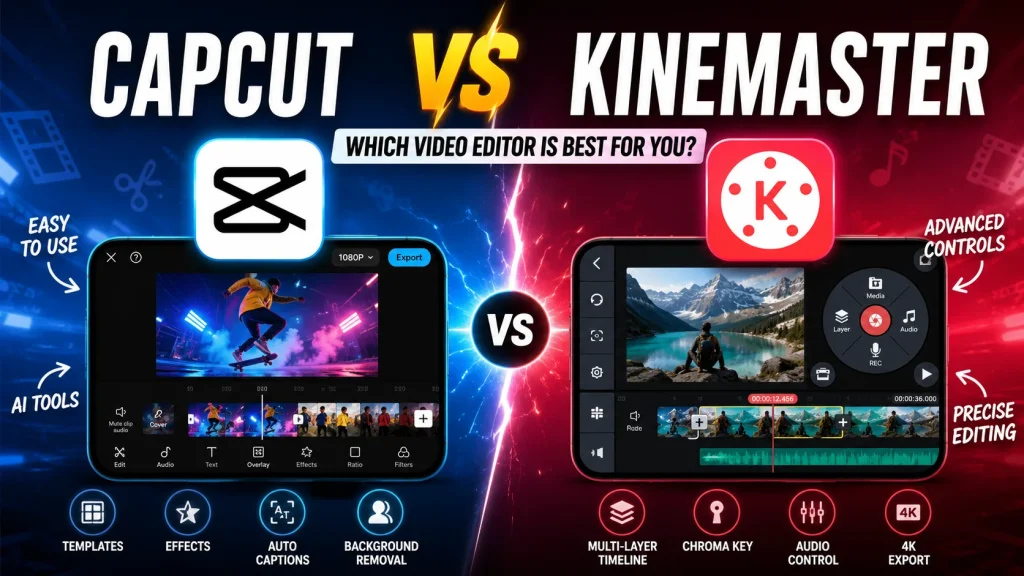
CapCut vs KineMaster: Feature Comparison
Choosing between CapCut vs KineMaster is not simply about selecting the app with the most features. It is about finding the editor that fits your workflow, skill level, and content style.
Let’s compare them feature by feature.
User Interface
CapCut has a modern, clean, and beginner-friendly design. Most editing tools are clearly labeled, making it easy to create videos within minutes.
KineMaster uses a professional-style interface with a circular tool menu and multiple editing panels. Although it may look slightly overwhelming at first, experienced editors appreciate the additional controls.
Editing Timeline
CapCut offers a straightforward multi-layer timeline that feels smooth and intuitive. Dragging clips, trimming videos, and arranging content require very little learning.
KineMaster provides more precise timeline controls. It allows frame-by-frame editing, better layer organization, and greater control over complex projects.
AI Editing Tools
Artificial intelligence has changed video editing dramatically. In the CapCut vs KineMaster comparison, CapCut clearly leads in AI-powered features.
CapCut includes:
- AI Auto Captions
- AI Background Removal
- AI Script Generator
- AI Video Enhancer
- AI Voice Effects
- AI Object Removal
- AI Image Generator
- AI Text-to-Speech
These tools reduce editing time significantly. KineMaster includes helpful editing tools but offers fewer AI-powered automation features.
Effects and Transitions
CapCut offers thousands of trendy filters, transitions, stickers, templates, and visual effects that are updated frequently. KineMaster provides a large library as well, but many premium assets require a subscription.
Templates
Templates are one of CapCut’s biggest strengths. With just a few taps, users can create professional-looking videos using trending templates.
This feature is especially useful for:
- TikTok creators
- Instagram creators
- YouTube Shorts creators
- Small businesses
- Beginners
KineMaster focuses more on manual editing instead of template-based creation.
Audio Editing
Audio quality can make or break a video.
Both apps provide:
- Voice recording
- Music library
- Sound effects
- Audio trimming
- Volume adjustment
- Fade in/out
- Noise reduction
However, KineMaster provides more detailed audio controls for experienced editors.
Chroma Key (Green Screen)
If you create gaming videos or educational content, green screen support matters. Both CapCut and KineMaster include Chroma Key. KineMaster has traditionally been known for excellent green-screen editing with detailed adjustments. CapCut has improved significantly and now delivers impressive results with minimal effort.
Text and Animation
Modern videos rely heavily on animated text.
CapCut includes:
- Animated titles
- Stylish fonts
- Motion graphics
- Auto captions
- Subtitle editing
- Text effects
KineMaster also offers powerful text animation tools with greater customization.
Export Quality
Both editors support high-quality exports.
CapCut supports:
- 720p
- 1080p
- 2K
- 4K
- High frame rates
KineMaster supports:
- HD
- Full HD
- 2K
- 4K
- Various bitrate controls
Platform Support
Another important point in the CapCut vs KineMaster comparison is platform availability.
CapCut works on:
- Android
- iPhone
- Windows
- Mac
- Web browser
KineMaster works on:
- Android
- iPhone
- Tablet devices
CapCut has become a more complete ecosystem thanks to its desktop and web versions.
Quick Comparison Table: CapCut vs KineMaster
| Feature | CapCut | KineMaster |
|---|---|---|
| Ease of Use | ⭐⭐⭐⭐⭐ | ⭐⭐⭐⭐☆ |
| Beginner Friendly | Excellent | Good |
| AI Editing Tools | Excellent | Limited |
| Templates | Huge Library | Smaller Library |
| Video Effects | Excellent | Very Good |
| Text Animation | Excellent | Excellent |
| Audio Editing | Very Good | Excellent |
| Chroma Key | Very Good | Excellent |
| Timeline Editing | Very Good | Excellent |
| Export Quality | Up to 4K | Up to 4K |
| Desktop Version | Yes | Limited |
| Best For | Social Media Creators | Professional Editors |
CapCut vs KineMaster Pricing
Both apps offer free versions, but premium subscriptions unlock additional features.
| Plan | CapCut | KineMaster |
|---|---|---|
| Free Version | Yes | Yes |
| Watermark in Free Version | Some features/templates may have limitations | Watermark on exports |
| Premium Subscription | Monthly & Annual | Monthly & Annual |
| AI Features | Included in Pro | Limited |
| Premium Assets | Yes | Yes |
| Cloud Storage | Available | Limited |
| Best Value | Excellent | Good |
If you mainly edit social media videos, CapCut Pro provides excellent value because of its AI tools and constantly updated templates. KineMaster’s premium plan is more suitable for users who want professional editing controls and advanced timeline management.
My Recommendations
After comparing every major feature in this CapCut vs KineMaster guide, it becomes much easier to choose the right app.
Choose CapCut if you:
- Create TikTok videos regularly.
- Make Instagram Reels.
- Upload YouTube Shorts.
- Want AI-powered editing.
- Prefer one-tap templates.
- Are a beginner.
- Need quick editing on mobile or desktop.
- Want trendy effects that update frequently.
CapCut is perfect for creators who value speed and simplicity. It allows you to produce impressive videos without spending hours learning complex editing techniques.
Choose KineMaster if you:
- Edit longer YouTube videos.
- Need frame-by-frame precision.
- Want detailed layer management.
- Frequently use green-screen editing.
- Prefer manual editing over templates.
- Already have video editing experience.
KineMaster rewards users who enjoy having complete control over every element of a project.
Which App Do I Recommend?
If someone asked me today which editor they should install first, I would recommend CapCut.
The reason is simple.
Most content creators now focus on short-form videos. CapCut’s AI features, templates, cloud syncing, desktop support, and user-friendly interface make editing faster than ever. However, if your projects involve detailed animations, professional editing workflows, or multi-layer compositions, KineMaster remains an excellent choice.
Conclusion
The CapCut vs KineMaster comparison shows that both apps are powerful video editing solutions, but they serve different audiences.
CapCut shines with its AI-powered editing, modern interface, trending templates, and effortless workflow. It is ideal for beginners, influencers, and social media creators who want professional-looking videos in less time.
KineMaster stands out with its advanced timeline editing, detailed customization, precise audio controls, and professional editing experience. It remains a favorite among creators who need greater control over complex projects.
Frequently Asked Questions
Is CapCut better than KineMaster?
CapCut is generally better for beginners and social media creators because it offers AI tools, ready-made templates, and a simpler editing experience. KineMaster is better suited for users who want more advanced manual editing controls.
Which app is easier to learn?
In the CapCut vs KineMaster comparison, CapCut is easier to learn because of its clean interface and intuitive editing tools.
Can I edit YouTube videos with CapCut?
Yes. CapCut supports long-form video editing and exports in high resolutions, making it suitable for YouTube videos as well as Shorts.
Does KineMaster support 4K video editing?
Yes. KineMaster supports editing and exporting videos in up to 4K resolution, depending on your device.
Which app has better AI features?
CapCut clearly leads in AI-powered editing. It includes automatic captions, background removal, AI enhancement, text-to-speech, and several other intelligent editing tools.
Is CapCut free?
Yes. CapCut offers a free version with many useful features. A Pro subscription unlocks additional AI tools, premium templates, cloud storage, and exclusive effects.
Is KineMaster worth paying for?
Yes. If you frequently create professional-quality videos and need advanced editing controls, KineMaster’s premium subscription can be a worthwhile investment.
Which app should beginners choose?
For most beginners, CapCut is the better starting point because it is easier to use, faster to learn, and packed with features that simplify the editing process.